

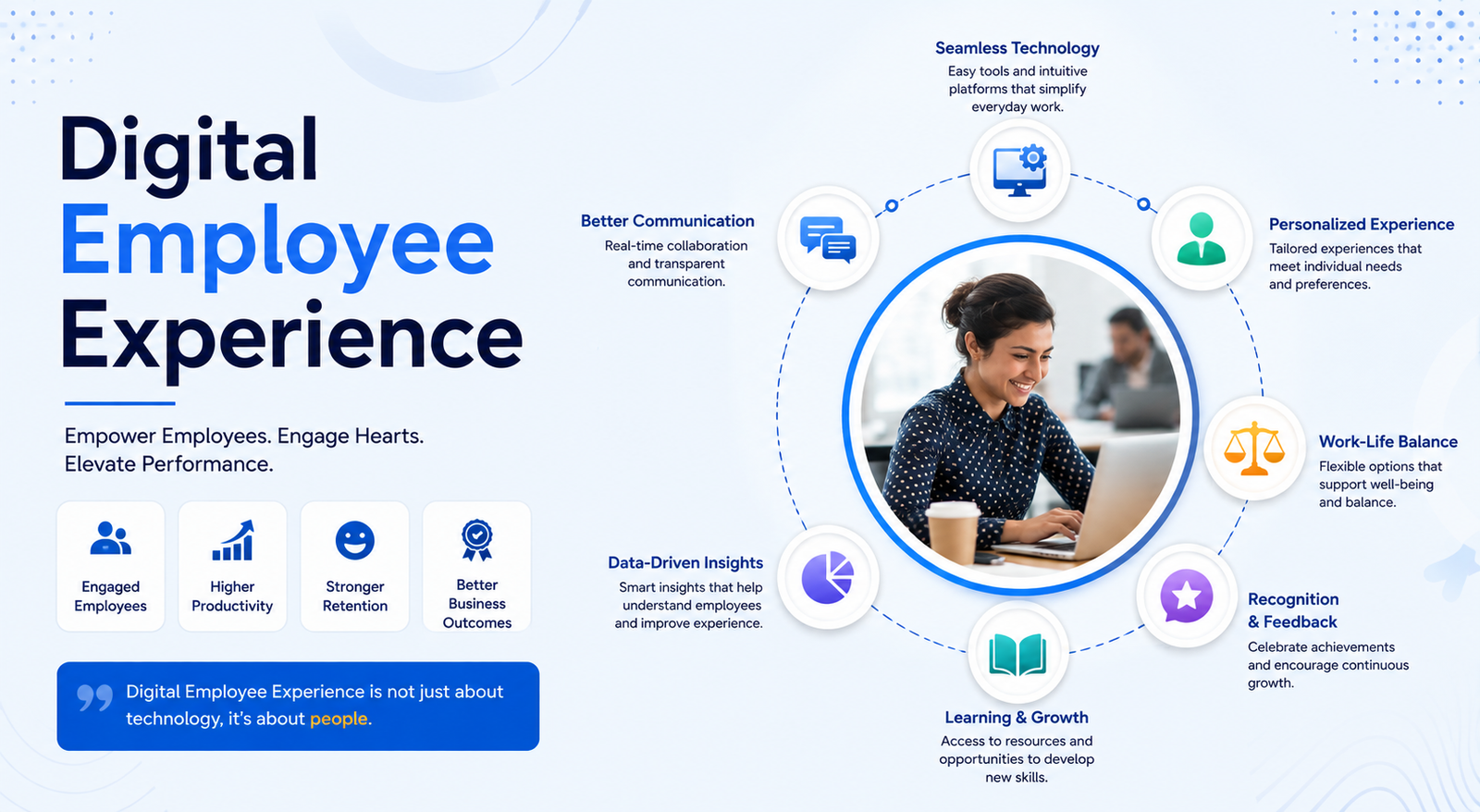
The workplace has changed dramatically over the past few years. Remote work, hybrid teams, cloud applications, and digital collaboration tools have become part of everyday business operations. While these technologies have increased flexibility, they have also introduced new challenges. Employees expect seamless access to applications, reliable devices, responsive IT support, and intuitive digital tools that help them work efficiently. This is where Digital Employee Experience (DEX) plays a crucial role.
A positive digital employee experience goes beyond providing laptops and software. It focuses on ensuring employees can perform their jobs without unnecessary technical frustrations. From faster onboarding to proactive IT support and AI-powered automation, organizations that invest in DEX often see improvements in productivity, engagement, retention, and overall business performance.
In this guide, you’ll learn what Digital Employee Experience (DEX) is, why it matters, its key components, common challenges, practical examples, and how businesses can create a digital workplace that empowers employees to succeed.
What Is Digital Employee Experience?
Digital Employee Experience (DEX) refers to the overall experience employees have when interacting with workplace technology. It includes every digital touchpoint employees use throughout their workday, including laptops, mobile devices, business applications, collaboration platforms, cloud services, and IT support systems.
Unlike traditional employee experience, which focuses on workplace culture and management, DEX specifically measures how technology affects employee satisfaction and productivity. When digital tools work smoothly, employees spend less time troubleshooting and more time focusing on meaningful work.
For example, imagine a remote employee who starts the day by logging into Microsoft Teams, accessing cloud documents, joining video meetings, and submitting expenses through an HR portal. If each system works seamlessly, the employee enjoys a positive digital experience. However, if applications are slow, passwords repeatedly fail, or devices frequently crash, productivity and morale quickly decline.
As organizations continue embracing digital transformation, Digital employee experience DEX has become a strategic priority for both HR and IT departments.
Why Digital Employee Experience Matters More Than Ever
Today’s workforce depends heavily on technology to complete everyday tasks. Employees expect workplace tools to be as easy to use as the consumer apps they rely on outside work. When these expectations aren’t met, frustration grows, collaboration suffers, and productivity declines.
Several workplace trends have made DEX more important than ever:
Hybrid and Remote Work
Employees now work from offices, homes, and while traveling. They require secure access to applications regardless of location. A strong digital experience ensures consistent performance across all work environments.
Higher Employee Expectations
Modern professionals expect reliable technology, intuitive software, and fast IT support. Organizations that fail to provide these experiences often struggle to attract and retain top talent.
Digital Transformation
Businesses continue investing in cloud computing, automation, AI, and collaboration platforms. DEX ensures these investments deliver real value instead of creating unnecessary complexity.
Better Business Performance
Employees who spend less time dealing with technology issues can focus on serving customers, completing projects, and driving innovation. Improved digital experiences often translate into stronger business outcomes.
Core Components of Digital Employee Experience
A successful DEX strategy combines multiple elements that work together to create a smooth digital workplace.
Technology and Devices
Employees need reliable laptops, desktops, smartphones, and tablets that perform efficiently throughout the workday. Slow hardware, outdated operating systems, and unreliable internet connections can significantly reduce productivity.
Businesses should regularly monitor device health, software updates, storage capacity, and system performance to prevent problems before they affect employees.
Business Applications
Employees interact with numerous applications every day, including project management platforms, CRM systems, accounting software, communication tools, and HR portals.
Applications should load quickly, integrate effectively, and provide consistent user experiences across devices. Poorly designed software creates unnecessary digital friction and increases support requests.
Collaboration and Communication
Modern workplaces rely on digital communication more than ever before. Collaboration tools allow employees to share information, manage projects, and work together regardless of location.
An effective DEX strategy supports:
- Instant messaging
- Video conferencing
- File sharing
- Team collaboration
- Knowledge management
- Digital workspaces
When communication tools function smoothly, teamwork improves naturally.
IT Support and Self-Service
Employees should be able to resolve common technology issues without waiting hours for assistance.
Modern organizations increasingly use:
- AI chatbots
- Self-service portals
- Automated password resets
- Virtual assistants
- Knowledge bases
These solutions reduce IT workloads while improving employee satisfaction.
Security and Compliance
Security should protect employees without creating unnecessary barriers.
A balanced approach includes:
- Multi-factor authentication
- Identity management
- Secure remote access
- Endpoint protection
- Data encryption
Employees should feel secure without constantly fighting security restrictions.
Employee Experience vs. Digital Employee Experience
Although these terms are often used interchangeably, they represent different concepts.
| Employee Experience | Digital Employee Experience |
| Focuses on overall workplace satisfaction | Focuses on interactions with workplace technology |
| Driven mainly by HR | Shared responsibility between HR and IT |
| Includes culture, leadership, and benefits | Includes software, devices, and digital tools |
| Covers every stage of employment | Focuses on digital workflows and technology |
| Measures employee engagement | Measures digital productivity and technology satisfaction |
Employee experience encompasses everything an employee encounters during their career, while digital employee experience focuses specifically on how technology supports or hinders their work.
Benefits of a Strong Digital Employee Experience
Organizations that invest in DEX often experience measurable improvements across multiple areas.
Increased Productivity
Reliable technology allows employees to complete tasks faster and with fewer interruptions. Instead of troubleshooting software problems, they can focus on delivering results.
Higher Employee Satisfaction
Employees appreciate workplaces where technology simply works. Reduced frustration contributes to better morale and stronger engagement.
Faster Onboarding
New hires can become productive more quickly when devices, accounts, and applications are ready from day one.
Reduced IT Support Costs
Automation and proactive monitoring identify issues before employees submit support tickets. This lowers help desk workloads while improving service quality.
Better Collaboration
Integrated communication platforms help teams share information more effectively, regardless of location.
Improved Employee Retention
Technology frustrations contribute to employee burnout. Organizations that prioritize DEX often improve retention by creating smoother daily work experiences.
Stronger Customer Experience
Happy, productive employees typically deliver better customer service, creating positive business outcomes beyond internal operations.
Common Digital Employee Experience Challenges
Despite significant technology investments, many organizations continue struggling with digital workplace issues.
Slow Devices
Employees lose valuable time waiting for computers to boot, applications to load, or files to synchronize.
Too Many Applications
Many organizations use dozens of disconnected software platforms. Constantly switching between tools reduces efficiency and increases frustration.
Poor Software Integration
Employees often enter the same information into multiple systems because applications don’t communicate effectively.
Weak Remote Connectivity
VPN issues, unstable internet connections, and cloud performance problems can significantly impact remote workers.
Digital Fatigue
Continuous notifications, virtual meetings, and excessive screen time contribute to employee exhaustion.
Limited IT Resources
Small IT teams frequently struggle to support growing numbers of remote employees and increasingly complex digital environments.
Security Restrictions
Overly complicated authentication processes may improve security but can reduce productivity when poorly implemented.
Signs Your Organization Has Poor Digital Employee Experience
Many organizations fail to recognize digital experience problems until productivity has already declined.
Common warning signs include:
- Employees frequently complain about slow technology.
- Help desk tickets continue increasing.
- Software adoption remains low.
- Employees avoid using approved applications.
- New hires struggle during onboarding.
- Collaboration tools are underutilized.
- System downtime interrupts daily work.
- Employees report digital frustration during surveys.
- High turnover is linked to workplace technology issues.
If several of these problems occur regularly, it’s time to evaluate your organization’s digital employee experience strategy.
Understanding Digital Friction
One of the biggest obstacles to an effective DEX strategy is digital friction. Digital friction refers to any unnecessary obstacle that prevents employees from completing work efficiently using technology.
Examples include:
- Repeated login requests
- Slow software performance
- Frequent application crashes
- Complex approval processes
- Poor system integration
- Manual data entry
- Outdated hardware
- Confusing user interfaces
Imagine a sales representative who needs to update customer information. Instead of entering the data once, they must log into three different systems, repeat the same information, wait for pages to load, and manually transfer files. Although each delay seems minor, together they waste valuable time every day.
Reducing digital friction improves productivity, employee satisfaction, and operational efficiency. Organizations should continuously identify pain points, gather employee feedback, and simplify digital workflows wherever possible.
By focusing on eliminating unnecessary complexity, businesses create a workplace where technology becomes an enabler of success rather than a barrier to getting work done.
How to Improve Digital Employee Experience
Creating an outstanding Digital Employee Experience (DEX) requires more than purchasing new software. It involves understanding employee needs, selecting the right technology, and continuously improving digital workflows.
1. Assess the Current Digital Workplace
Start by identifying pain points. Conduct employee surveys, analyze IT support tickets, and monitor application performance to understand where employees struggle most.
2. Modernize Workplace Technology
Replace outdated hardware and legacy software with modern, cloud-based solutions. Employees should have access to reliable devices and fast applications that support their daily work.
3. Simplify Digital Workflows
Reduce unnecessary steps in routine tasks. Integrate business applications to eliminate duplicate data entry and automate repetitive processes wherever possible.
4. Improve IT Support
Provide self-service portals, AI chatbots, and knowledge bases so employees can resolve common issues quickly without waiting for IT assistance.
5. Invest in Employee Training
Even the best technology delivers limited value if employees don’t know how to use it. Offer regular training sessions, tutorials, and digital adoption programs to improve confidence and productivity.
6. Gather Continuous Feedback
Employee expectations evolve over time. Regular feedback helps organizations identify new challenges and continuously improve the digital workplace.
Digital Employee Experience Metrics (KPIs)
Measuring DEX helps organizations determine whether their investments are improving employee productivity and satisfaction.
| KPI | Why It Matters |
| Employee Satisfaction Score | Measures overall digital experience |
| Employee Net Promoter Score (eNPS) | Indicates employee loyalty |
| Application Performance | Identifies slow or unreliable software |
| Device Health Score | Monitors hardware reliability |
| IT Ticket Volume | Shows recurring technology issues |
| Ticket Resolution Time | Measures IT support efficiency |
| Software Adoption Rate | Indicates employee engagement with new tools |
| System Downtime | Tracks business disruptions |
| Login Success Rate | Reflects authentication effectiveness |
| Employee Productivity | Measures overall business impact |
Reviewing these KPIs regularly enables IT and HR teams to make informed decisions and improve workplace technology continuously.
Best Digital Employee Experience Tools
Choosing the right Digital employee experience software depends on business size, goals, and existing technology infrastructure.
| Tool | Best For | Key Features |
| Microsoft Viva | Employee engagement | Learning, communication, analytics |
| Nexthink | Experience monitoring | Real-time analytics, endpoint visibility |
| Lakeside Software | Endpoint intelligence | Device monitoring, user insights |
| ServiceNow | IT service management | Workflow automation, self-service |
| VMware Workspace ONE | Device management | Unified endpoint management |
| Digital employee experience ManageEngine | IT operations | Endpoint monitoring, asset management, service desk integration |
Many organizations also invest in a comprehensive Digital employee experience platform that combines monitoring, analytics, automation, and employee feedback in one solution.
AI and the Future of Digital Employee Experience
Artificial intelligence is transforming workplace technology by making systems smarter and more proactive.
Modern AI capabilities include:
- Intelligent virtual assistants
- Automated IT support
- Predictive issue detection
- Personalized employee recommendations
- Smart knowledge management
- Automated onboarding
- Self-healing devices
- Workflow automation
Instead of waiting for employees to report problems, AI can identify potential issues before they affect productivity. This proactive approach reduces downtime and improves employee satisfaction.
As AI continues evolving, organizations will increasingly rely on intelligent automation to deliver personalized and seamless digital experiences.
Digital Employee Experience Across the Employee Lifecycle
DEX influences every stage of an employee’s journey.
Recruitment
A smooth application process and professional digital communication create a positive first impression.
Onboarding
Providing devices, accounts, and software access before an employee’s first day accelerates productivity.
Daily Work
Reliable applications, secure collaboration tools, and responsive IT support help employees perform at their best.
Learning and Development
Digital learning platforms make it easier for employees to develop new skills and advance their careers.
Career Growth
Performance management systems and internal communication platforms support continuous development and employee engagement.
Offboarding
Well-managed digital processes ensure secure account removal, knowledge transfer, and asset recovery.
Digital Employee Experience Example
Consider a global marketing agency with employees working from different countries.
Previously, staff experienced:
- Slow VPN connections
- Frequent software crashes
- Long IT response times
- Multiple password resets
- Poor collaboration
The company introduced a new Digital employee experience platform featuring proactive monitoring, automated password management, AI-powered support, and cloud-based collaboration.
Within six months, the organization achieved:
- Faster issue resolution
- Fewer IT support tickets
- Improved employee satisfaction
- Better collaboration
- Higher productivity
- Reduced employee frustration
This Digital employee experience example demonstrates how investing in better workplace technology can directly improve business performance.
Digital Employee Experience Gartner Perspective
According to Digital employee experience Gartner research and industry guidance, organizations should shift from reactive IT support to proactive experience management. Rather than waiting for employees to report issues, businesses should continuously monitor digital environments, identify potential disruptions early, and optimize workplace technology before productivity is affected.
This employee-centric approach helps organizations improve engagement, reduce downtime, and maximize the return on digital transformation initiatives.
Digital Employee Experience PPT
Many organizations create a Digital employee experience PPT to present DEX strategies to leadership teams. An effective presentation typically includes:
- Definition of DEX
- Current workplace challenges
- Employee feedback
- Key business benefits
- KPI dashboard
- Technology roadmap
- Recommended tools
- Implementation timeline
- Expected ROI
Using clear visuals, charts, and real-world examples makes it easier to gain stakeholder support for DEX initiatives.
Best Practices for Building a Strong DEX Strategy
Follow these best practices to create a modern digital workplace:
- Put employee needs first.
- Standardize workplace technology.
- Continuously monitor device health.
- Reduce digital friction.
- Encourage employee feedback.
- Automate repetitive IT tasks.
- Strengthen cybersecurity without reducing usability.
- Invest in digital skills training.
- Measure success using meaningful KPIs.
- Review and improve your strategy regularly.
Common Mistakes to Avoid
Many organizations struggle because they focus only on technology rather than employee needs.
Avoid these mistakes:
- Purchasing software without a clear strategy
- Ignoring employee feedback
- Using too many disconnected applications
- Neglecting employee training
- Measuring only IT performance instead of user experience
- Delaying software updates
- Overcomplicating security processes
- Failing to monitor digital experience continuously
Building a Successful Digital Employee Experience Strategy
A successful DEX strategy follows a structured approach:
- Define business objectives.
- Assess the current employee experience.
- Identify digital pain points.
- Select the right technologies.
- Implement improvements in phases.
- Train employees effectively.
- Monitor KPIs regularly.
- Gather employee feedback.
- Optimize continuously.
This ongoing process ensures workplace technology evolves alongside business and employee needs.
Future Trends in Digital Employee Experience
The future of DEX will focus on personalization, automation, and intelligent workplace experiences.
Key trends include:
- AI-powered workplace assistants
- Predictive analytics
- Hyperautomation
- Personalized digital workspaces
- Experience-first IT strategies
- Advanced employee analytics
- Smarter endpoint management
- Greater use of cloud-native platforms
- Enhanced cybersecurity with minimal disruption
Organizations that embrace these innovations will be better positioned to attract top talent, improve productivity, and remain competitive.
Conclusion
Digital Employee Experience is no longer just an IT initiative—it is a business strategy that directly influences employee satisfaction, productivity, retention, and organizational success. By providing reliable technology, simplifying workflows, reducing digital friction, and using data-driven insights, businesses can create a workplace where employees are empowered to do their best work.
Whether you’re adopting new Digital employee experience tools, evaluating Digital employee experience software, or implementing a complete Digital employee experience platform, success depends on continuously listening to employees and optimizing their digital journey. Organizations that prioritize DEX today will be better prepared for the future of work.
Frequently Asked Questions
1. What is Digital Employee Experience (DEX)?
Digital Employee Experience (DEX) is the overall experience employees have while using workplace technology, including devices, software, collaboration platforms, and IT support.
2. Why is Digital Employee Experience important?
A strong DEX improves productivity, employee engagement, collaboration, job satisfaction, and business performance while reducing IT support costs.
3. What are the best Digital employee experience tools?
Popular tools include Microsoft Viva, Nexthink, ServiceNow, VMware Workspace ONE, Lakeside Software, and ManageEngine.
4. How can businesses measure Digital Employee Experience?
Organizations can measure DEX using KPIs such as employee satisfaction, application performance, IT ticket volume, software adoption, device health, and system uptime.
5. What is the difference between employee experience and Digital Employee Experience?
Employee experience covers every aspect of an employee’s relationship with an organization, while DEX focuses specifically on the technology employees use to perform their work.
6. How does AI improve Digital Employee Experience?
AI enhances DEX through predictive analytics, automated IT support, intelligent virtual assistants, workflow automation, and proactive issue detection.
7. What should a Digital employee experience PPT include?
A DEX presentation should include business objectives, current challenges, employee feedback, KPIs, technology recommendations, implementation plans, expected ROI, and future improvements.
You May Also Read: economic environment
